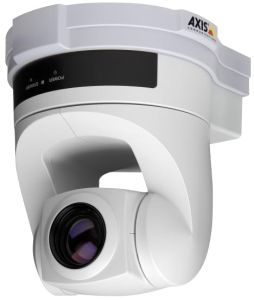
AXIS 214 PTZ Network IP Camera
The Axis 214 PTZ Network Camera enables advanced remote monitoring with pan, tilt and zoom control over IP networks. It features a powerful 18x optical zoom (+ 12x digital), auto focus lens and an automatic infrared mode for nighttime conditions.
The Axis 214 PTZ delivers superior quality Motion JPEG and video streams simultaneously. The camera provides 20 preset positions and 1 preset sequence (auto patrol) to monitor specific areas. It also offers pre- and post-alarm image buffering and advanced event management features.
The optional Axis 214 PTZ includes two-way audio, one alarm input and one alarm output.
The Axis 214 PTZ connects directly to an IP network. The camera provides wide coverage with the ability to pan +/- 170 degrees, tilt -30 degrees to +90 degrees and zoom 18x optical, 12x digital.
The Axis 214 PTZ Network Camera carries an . The warranty applies to purchases made from 1st January 2007.
The Axis 214 PTZ Network Camera is available for purchase under the Axis 30-day Scheme
AXIS 214 PTZ Network IP Camera Features
Superior image quality in simultaneous Motion JPEG and video streams
Frame rate, up to 25 frames per second (PAL) at 768 x 576
Operates under all light conditions, indoors as well as outdoors
Colour mode: 0.3 lux at F1.4, 30IRE
Black/white mode: 0.005 lux at F1.4, 30IRE
Infrared mode: camera can be manually controlled or scheduled for switching between colour image during daytime, and black and white image in low light or night time conditions using an external infrared lamp
Multiple user access levels with password protection
IP address filtering
Up to 20 viewers can directly access the camera simultaneously; virtually unlimited viewers if streamed through a relaying server
1 alarm input and 1 relay output
Two-way, full duplex G.711 PCM 64kbit/s, G.726 ADPCM 32 or 24 kbit/s
Advanced event management: scheduled and triggered event functionality with alarm notification via e-mail, TCP, HTTP, and image uploading via e-mail, FTP & HTTP
Easy installation using the free Axis Internet Dynamic DNS Service or the Windows-based Axis IP Utility software
AXIS 214 PTZ Network IP Camera System Requirements
The following specifications apply to the use of browser-based viewing. When using a software application , please refer to the specifications provided with the software.
Hardware:
CPU; Pentium III 500 MHz or higher, any AMD Athlon.
Memory;128 MB RAM
Meeting the specification for the selected operating system and browser
Graphic card1; AGP card with Direct Draw support and 32 MB video memory
Software:
Windows; versions Win2000 and XP, Win98*, WinNT4.0*, Direct X 9.0 or later
Supported Browsers; Internet Explorer 5.x or later
* Motion JPEG only
AXIS 214 PTZ Network IP Camera Accessories
Milestone Xprotect is based on four main offerings scaled in functionality and price which offer multi-hardware support and robust performance. Milestone XProtect can control up to 64 cameras per server, with multiple servers and multiple sites.
is a (Free !) software solution for the simultaneous viewing and recording of high-quality H.264, MPEG-4 and Motion JPEG video from a single surveillance camera.
software offers Windows PC users all the necessary video recording and monitoring functions for security surveillance. The software supports up to 50 cameras/video servers per installation and an unlimited recording database (limited only by hardware!).
Axis Camera Management is a powerful and efficient installation and management tool for use with Axis video products.
, an IP66-rated Dome Housing for installation of the camera in outdoor or adverse, indoor environments.
can be used to produce an image in total darkness at ranges up to 250m.
Request Information: Axis 214 PTZ "Technical Data Sheet", 484 kB pdf file. Axis T95A Series Dome Housing "Technical Data Sheet", 495 kB pdf file. Axis 214 PTZ "User's Manual", 1.455 MB pdf file. Axis 214 PTZ "Installation Guide", 916 kB pdf file. Axis "IP Surveillance Design Guide", 12.914 MB pdf file.
To view the .pdf file, you will need the free Adobe® Acrobat® Reader or plug-in. If you do not have Acrobat Reader, please select the "Get Acrobat Reader" icon for further instructions.
AXIS 214 PTZ - Order Details



 Axis 214 PTZ "Technical Data Sheet", 484 kB pdf file.