|
The distribution of data across multiple disks can be managed by either dedicated hardware or by software.
With a software implementation, the operating system manages the disks of the array through the normal drive controller. A hardware implementation of RAID requires at a minimum a special-purpose RAID controller. Hardware implementations also typically support hot swapping, allowing failed drives to be replaced while the system is running.
Both hardware and software versions may support the use of a hot spare, a preinstalled drive which is used to immediately (and almost always automatically) replace a drive that has failed. This reduces the mean time to repair period during which a second drive failure in the same RAID redundancy group can result in loss of data.
It is also possible to use nested RAID levels. That is, one RAID can use another as its basic element, instead of using physical disks. It is instructive to think of these arrays as layered on top of each other, with physical disks at the bottom.
Common nested RAID levels:
RAID 01: A mirror of stripes
RAID 10: A stripe of mirrors
RAID 50: A stripe across dedicated parity RAID systems
RAID 51: A mirror striped set with distributed parity (some manufacturers label this as RAID 53)
RAID 100: A stripe of a stripe of mirrors
RAID 10
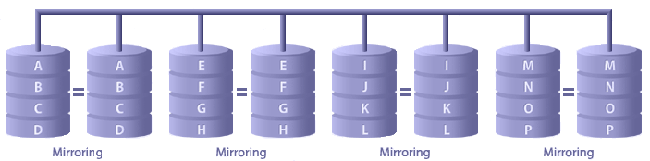
This is the most commonly deployed hybrid configuration, and is not defined by the UCB white papers. It is a combination of striping and mirrors. In this configuration data is striped over two or more drives and mirrored to an exactly duplicated subsystem. RAID 10 provides the best performance and the best fault-tolerance, is “hot pluggable”, and can be reconstructed on-the-fly without interrupting file-system access.
JBOD
Although not a RAID system, a concatenation of disks (also called JBOD, or "Just a Bunch of Disks") is also a popular method for combining multiple
physical disk drives into a single virtual disk.
What RAID Can Do
RAID can protect uptime. RAID levels 1, 0+1/10, 5, and 6 (and their variants such as 50 and 51) allow a mechanical hard disk to fail while keeping the data on the array accessible to users.
RAID can increase performance in certain applications. RAID levels 0, and 5-6 all use variations on striping, which allows multiple spindles to increase sustained transfer rates when conducting linear transfers.
What RAID Cannot Do
RAID cannot protect the data on the array. A RAID array has one file system. This creates a single point of failure. A RAID array's file system is vulnerable to a wide variety of hazards other than physical disk failure, so RAID cannot defend against these sources of data loss.
RAID will not stop a virus from destroying data.
RAID will not prevent corruption.
RAID will not save data from accidental modification or deletion by the user.
RAID does not protect data from hardware failure of any component besides physical disks.
RAID does not protect data from natural or man made disaster such as fires and floods. To protect data, data must be backed up to removable media, such as DVD, tape, or an external hard drive, and stored in an off site location.
RAID alone will not prevent a disaster from turning into data loss. Disaster is not preventable, but backups allow data loss to be prevented.
Solutions for Reliable Storage
It is not commonly understood that in any array of tightly-packed drives, the vibration of other disks increases the stress and wear on every disk. Further, the tight packing means that the heat dissipation from any one disk heats up the disks on either side of it, exacerbating the problem of keeping the disks cool. RAID 5 makes disks work particularly hard, and the harder they work, the hotter they get, especially during rebuild of a failed disk, which is a long and complex process. When used as a storage system for surveillance, the RAID array cannot be taken offline, but must continue to record while a disk is rebuilt. Many RAID 5 solutions require arrays of identical disks – capacities cannot be mixed. Some cheaper arrays require even identical disk make and models. This is not terribly convenient for field servicing. When a disk does fail, it must be replaced right away, as a further failure would cause the loss of all data – exactly what MUST NOT HAPPEN in a mission-critical enterprise system.
There is another problem: RAID arrays were first proposed in 1988, when hard disks were tiny. The rebuild times for a RAID 5 array with 250GB drives are considerable. It should be noted that, the bigger the drive, the longer the rebuild time. 500GB and 1TB drives are now common, and very cost-effective. However, a RAID 5 rebuild can take days with such massive disks, and all that time the array is working in degraded mode, and working that much harder, and yet still has to continue recording. Should a second disk fail in that time, all data will be lost. This is not a theoretical situation, but one that many integrators of RAID 5 systems are beginning to experience.
RAID 5 for surveillance applications is looking increasingly redundant, if you’ll pardon the expression. Given the decreasing cost of drives, RAID 1 is looking increasingly attractive, at least for enterprise systems.
|